Добрый день, @alexander.erohin!
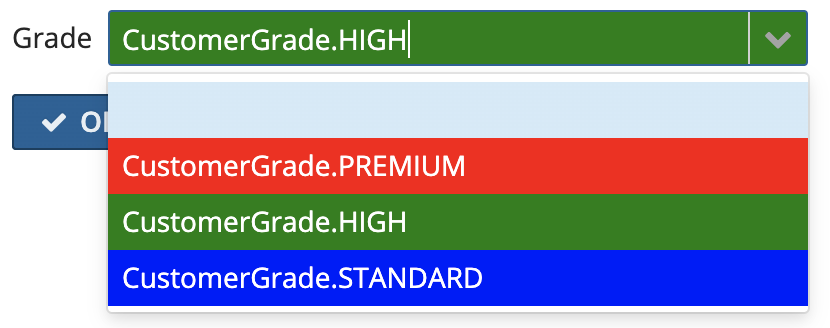
Вам нужно подписаться на ValueChangeEvent компонента lookupField и в зависимости от значения в компоненте устанавливаться стиль с помощью lookupField#setStyleName. Также нужно добавить селекторы в файл стилей.
CustomerEdit
@UiController("sample_Customer.edit")
@UiDescriptor("customer-edit.xml")
@EditedEntityContainer("customerDc")
@LoadDataBeforeShow
public class CustomerEdit extends StandardEditor<Customer> {
    @Inject
    private LookupField<CustomerGrade> gradeField;

    @Install(to = "gradeField", subject = "optionStyleProvider")
    private String gradeFieldOptionStyleProvider(CustomerGrade grade) {
        if (grade != null) {
            switch (grade) {
                case HIGH:
                    return "high-grade";
                case PREMIUM:
                    return "premium-grade";
                case STANDARD:
                    return "standard-grade";
            }
        }
        return null;
    }

    @Subscribe("gradeField")
    public void onGradeFieldValueChange(HasValue.ValueChangeEvent<CustomerGrade> event) {
        CustomerGrade grade = event.getValue();
        String styleName = "";
        if (grade != null) {
            switch (grade) {
                case HIGH:
                    styleName = "high-grade";
                    break;
                case PREMIUM:
                    styleName = "premium-grade";
                    break;
                case STANDARD:
                    styleName = "standard-grade";
                    break;
            }
        }

        gradeField.setStyleName(styleName);
    }
}
customer-edit.xml
<?xml version="1.0" encoding="UTF-8" standalone="no"?>
<window xmlns="http://schemas.haulmont.com/cuba/screen/window.xsd"
        caption="msg://customerEdit.caption"
        focusComponent="form"
        messagesPack="com.company.sample.web.screens.customer">
    <data>
        <instance id="customerDc"
                  class="com.company.sample.entity.Customer">
            <view extends="_local"/>
            <loader/>
        </instance>
    </data>
    <dialogMode height="600"
                width="800"/>
    <layout expand="editActions" spacing="true">
        <form id="form" dataContainer="customerDc">
            <column width="350px">
                <textField id="nameField" property="name"/>
                <lookupField id="gradeField" property="grade"/>
            </column>
        </form>
        <hbox id="editActions" spacing="true">
            <button action="windowCommitAndClose"/>
            <button action="windowClose"/>
        </hbox>
    </layout>
</window>
hover-ext.scss
@mixin com_company_sample-hover-ext {
  .v-filterselect-premium-grade > .v-filterselect-input,
  .v-filterselect-item-premium-grade {
     background-color: red;
     color: white;
  }

  .v-filterselect-high-grade > .v-filterselect-input,
  .v-filterselect-item-high-grade {
     background-color: green;
     color: white;
  }

  .v-filterselect-standard-grade > .v-filterselect-input,
  .v-filterselect-item-standard-grade {
     background-color: blue;
     color: white;
  }
}
Результат
С уважением,
Глеб
