Добрый день.
Вынесу вопрос из этой темы в отдельную.
Подскажите, пожалуйста, есть ли возможность добавить контекстное действие для “главной” вкладки?
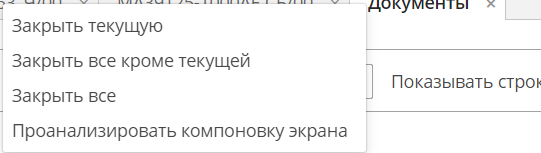

Добрый день.
Вынесу вопрос из этой темы в отдельную.
Подскажите, пожалуйста, есть ли возможность добавить контекстное действие для “главной” вкладки?
Добрый день.
Чтобы добавить дейсвие в контекстное меню вкладок, необходимо расширить компонент WebAppWorkArea и реализовать кастомный ActionHandler для TabSheet, например:
import com.haulmont.cuba.web.gui.components.mainwindow.WebAppWorkArea;
import com.haulmont.cuba.web.widgets.HasTabSheetBehaviour;
import com.vaadin.event.Action;

public class CustomAppWorkArea extends WebAppWorkArea {

    @Override
    protected Action.Handler createTabSheetActionHandler(HasTabSheetBehaviour tabSheet) {
        return new CustomMainTabSheetActionHandler(tabSheet);
    }
}
import com.haulmont.cuba.core.global.AppBeans;
import com.haulmont.cuba.core.global.Messages;
import com.haulmont.cuba.web.gui.components.mainwindow.MainTabSheetActionHandler;
import com.haulmont.cuba.web.widgets.HasTabSheetBehaviour;
import com.haulmont.cuba.web.widgets.TabSheetBehaviour;
import com.vaadin.event.Action;
import org.apache.commons.lang3.ArrayUtils;

public class CustomMainTabSheetActionHandler extends MainTabSheetActionHandler {

    protected com.vaadin.event.Action myCustomAction;

    public CustomMainTabSheetActionHandler(HasTabSheetBehaviour tabSheet) {
        super(tabSheet);
    }

    @Override
    public Action[] getActions(Object target, Object sender) {
        Action[] actions = super.getActions(target, sender);

        if (myCustomAction == null) {
            Messages messages = AppBeans.get(Messages.NAME);
            myCustomAction = new com.vaadin.event.Action(messages.getMainMessage("actions.myCustomAction.caption"));
        }

        return ArrayUtils.add(actions, myCustomAction);
    }

    @Override
    public void handleAction(Action action, Object sender, Object target) {
        super.handleAction(action, sender, target);

        TabSheetBehaviour tabSheetBehaviour = tabSheet.getTabSheetBehaviour();
        if (initialized) {
            if (myCustomAction == action) {
                // do some stuff
            }
        }
    }
}
Для добавления действий в контекстное меню диалоговых окон, необходимо расширить компонент WebDialogWindow:
import com.haulmont.cuba.core.global.Messages;
import com.haulmont.cuba.web.gui.components.WebDialogWindow;
import com.vaadin.event.Action;

import java.util.ArrayList;
import java.util.List;

public class CustomWebDialogWindow extends WebDialogWindow {

    @Override
    protected void setupContextMenu() {
        super.setupContextMenu();

        dialogWindow.addContextActionHandler(new CustomDialogWindowActionHandler());
    }

    protected class CustomDialogWindowActionHandler implements com.vaadin.event.Action.Handler {

        protected com.vaadin.event.Action myCustomAction;

        protected boolean initialized = false;

        public CustomDialogWindowActionHandler() {
        }

        @Override
        public com.vaadin.event.Action[] getActions(Object target, Object sender) {
            if (!initialized) {
                Messages messages = beanLocator.get(Messages.NAME);

                myCustomAction = new com.vaadin.event.Action(messages.getMainMessage("actions.myCustomAction.caption"));
                // init more actions

                initialized = true;
            }

            List<Action> actions = new ArrayList<>(3);
            actions.add(myCustomAction);
            // add more actions

            return actions.toArray(new com.vaadin.event.Action[0]);
        }

        @Override
        public void handleAction(com.vaadin.event.Action action, Object sender, Object target) {
            if (initialized) {
                if (myCustomAction == action) {
                    // do some stuff
                }
            }
        }
    }
}
Для регистрации новых компонентов необходимо создать файл ui-component.xml:
<?xml version="1.0" encoding="UTF-8" standalone="no"?>
<components xmlns="http://schemas.haulmont.com/cuba/components.xsd">
    <component>
        <name>workArea</name>
        <class>com.company.demo.web.app.CustomAppWorkArea</class>
    </component>
    <component>
        <name>dialogWindow</name>
        <class>com.company.demo.web.app.CustomWebDialogWindow</class>
    </component>
</components>
И добавить в web-app.properties атрибут cuba.web.componentsConfig со ссылкой на этот файл:
cuba.web.componentsConfig = +com/company/demo/ui-component.xml
Глеб